PLATFORM / DISCOVERY & SHADOW AI

Inventory the AI activity nobody registered.

Connect the discovery sources you already use to surface AI activity missing from your connected inventory. Review the evidence, the identities associated where available, and the next governance action. It is the lowest-friction place to start: read-only, out of the path, and nothing changes how your agents run.

Read-only, never in the path Start with one source you already run Exportable AI-BOM
EXAMPLE TENANT · ILLUSTRATIVE FINDINGS NEXT ACTION OpenAI API · 38 people NETWORK & ENDPOINT · ZSCALER · ACTOR DIRECTORY-LINKED REVIEW NOT REGISTERED Microsoft 365 Copilot IDENTITY & SAAS AUDIT · ENTRA ID · ACTOR MATCHED VERIFY COVERAGE REGISTERED PRODUCT Anthropic via LiteLLM LLM GATEWAYS · LITELLM · ACTOR NOT SUPPLIED NEEDS ATTRIBUTION NOT REGISTERED Gemini key in a CI job SIEM & LOG FEEDS · SPLUNK · SERVICE ACCOUNT, NO OWNER ASSIGN OWNER NOT REGISTERED A recognized product is not proof of governed usage.

A finding names what was observed, the source that saw it, and whose activity it was where the evidence allows. The next step — register, assign an owner, attach a policy — is a separate, deliberate governance action. Example data, not a live tenant.

Read-onlyPushPollList callRegisteredno interception

01 / INVENTORY

What AI is running?

Products, agents and model runtimes seen by the sources you connect, each with the record that revealed it.

02 / ATTRIBUTION

Who is using it?

The people and service accounts behind the activity, where the source carries identity. Unknown stays visible.

03 / GOVERNANCE

Is it governed?

Each finding checked against what you have registered, with the next governance action named.

In the product

See Discovery in the console.

Recorded on a demo tenant: a Shadow AI finding with its reason and evidence, what each source family can discover and attribute, a cloud account enumerating its agents, and MCP catalog discovery.

Inside GovernorAI/ DiscoveryRecorded demo tenant

Discovery, step by step

Four screens from a recorded demo tenant.

Watch the full 2-minute walkthrough →
Recorded against a demo tenant with seeded activity. Real product screens, not a mock-up.

Also in the product

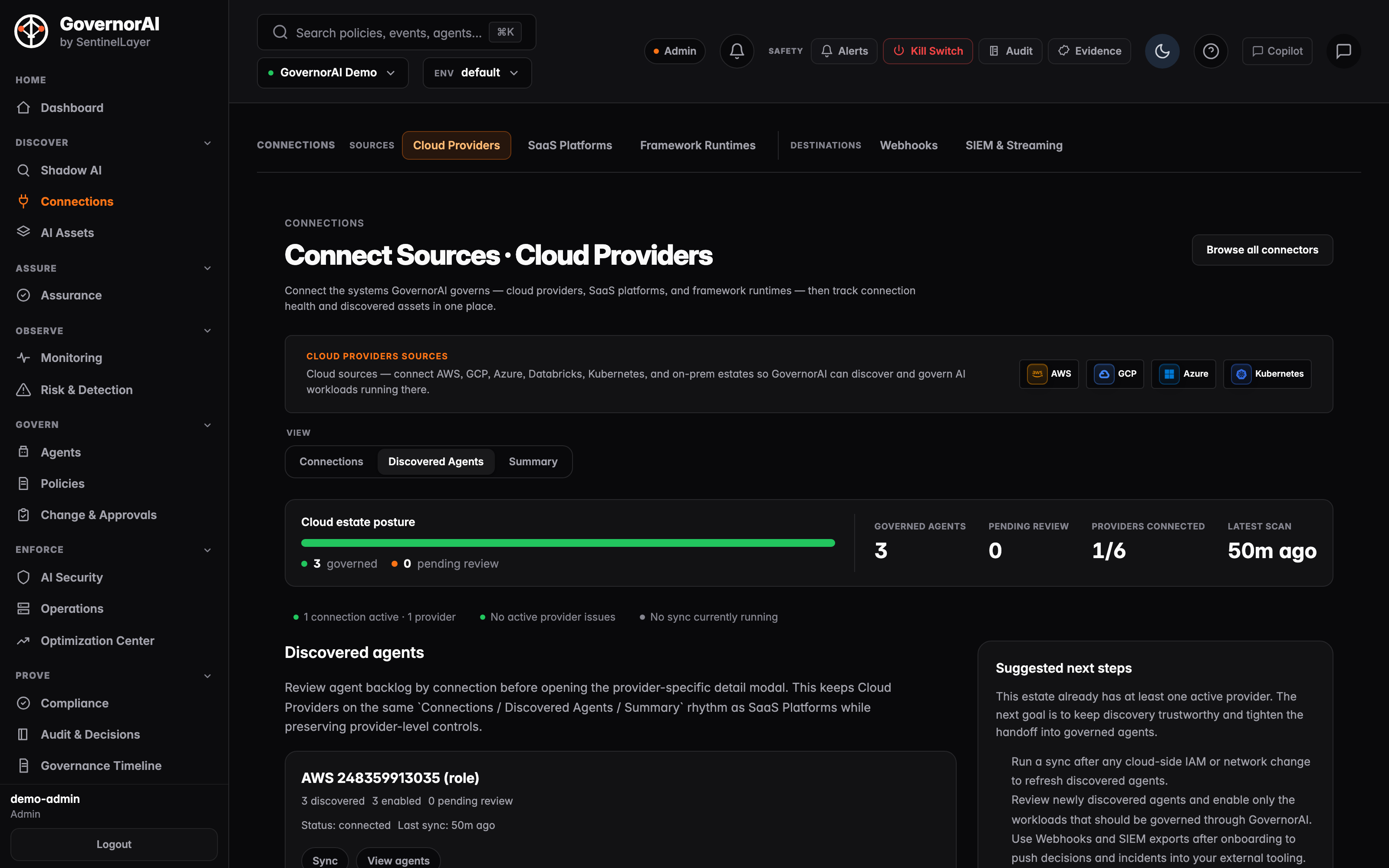
GovernorAI Connect Sources, Cloud Providers view showing a cloud estate posture bar reading 3 governed and 0 pending review, tiles for governed agents, pending review, providers connected and latest scan, a status line reading one connection active with no active provider issues, and a connection card for an AWS account connected by role showing 3 discovered, 3 enabled and 0 pending review
Connect Sources · Cloud Providers A read-only role connection to one AWS account, with the agents discovery found and their review state
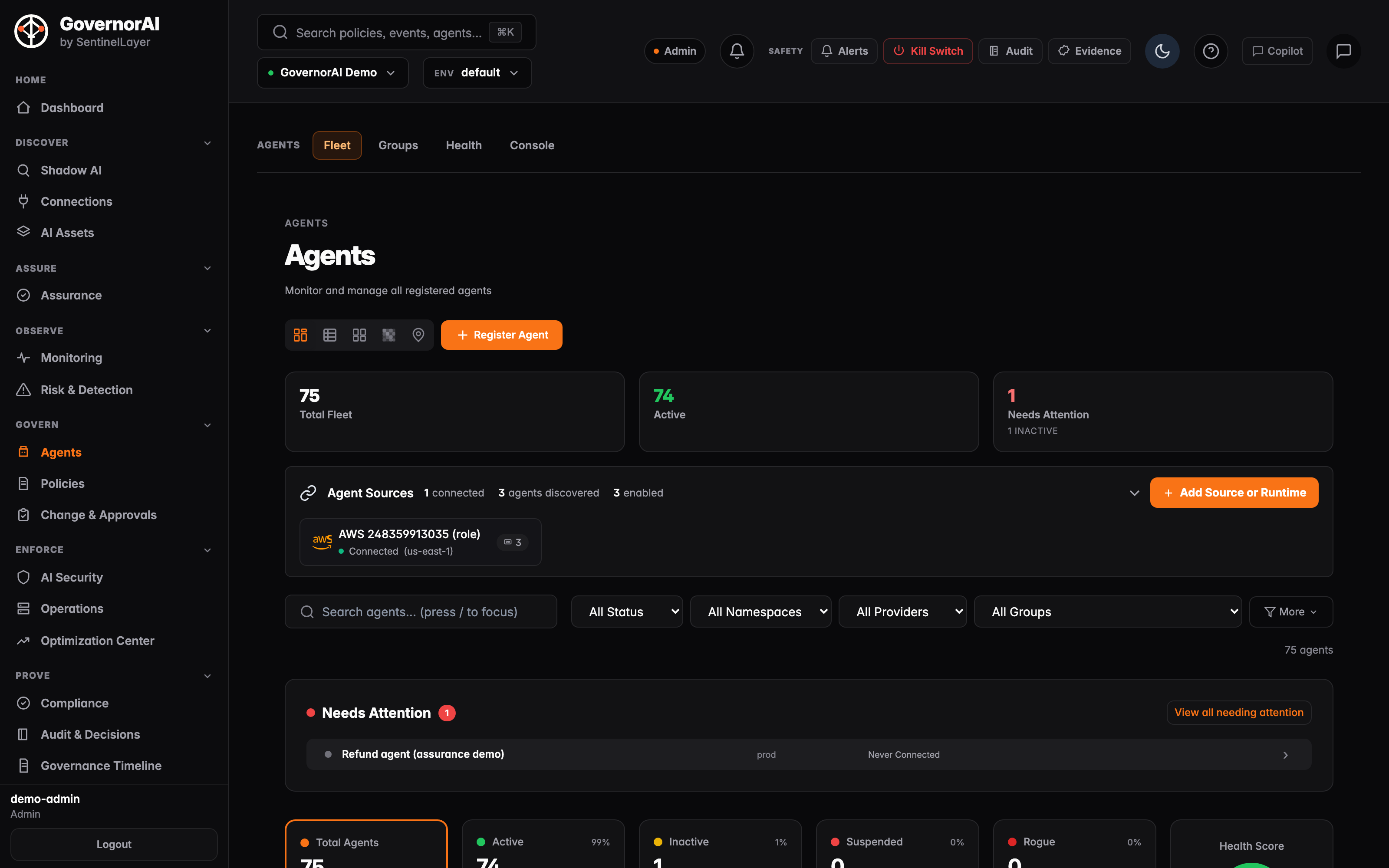
GovernorAI Agents fleet view showing 75 agents in the total fleet, 74 active and 1 needing attention, an agent-sources row reporting one connected AWS account with 3 agents discovered and 3 enabled, and a Needs Attention list naming the flagged agent with its reason: never connected
Agents · Fleet Every registered agent, with the ones needing attention named and the reason stated

WHY ONE VENDOR IS NOT ENOUGH

Every tool sees one slice of your AI use.

Your proxy sees traffic leaving the network, not the Copilot features inside a suite you already pay for. Your identity provider sees an OAuth grant, not an API key in a build job. Your endpoint agent sees a local model, your LLM gateway only the traffic routed through it. Each answer is right about its slice and silent about the rest. Discovery reads them together and correlates them into one inventory, with the source of every finding named.

AI activitySIEM & log feedsNetwork & endpointIdentity & SaaS auditLLM gateways
Browser use of AI appsChatGPT, Claude or Gemini in a browser tabPartlySees itPartly—
AI built into your SaaSCopilot in Microsoft 365, Gemini in WorkspacePartly—Sees it—
OAuth grants to AI appsA user connects an AI tool to their mailbox or drive——Sees it—
API keys in code and CIA build job calling a model API with a personal keyPartlySees it—Partly
Local models and CLIsA model runtime or AI CLI on a laptop—Sees it——
Traffic through your gatewayWhich keys and users called which modelsPartly——Sees it

Typical visibility. What each tool actually sees depends on what it is configured to log and export; a SIEM sees only what is forwarded to it. Agents running in your cloud accounts are found by cloud inventory rather than by these signals.

HOW THE SIGNALS BECOME ONE FINDING

Correlation intelligence built for AI activity.

A single classification falls short. A destination match says which AI product was called, not by whom or whether it is governed. A sign-in says who, not what they sent. A steady rhythm of calls looks like an autonomous agent, and also like a cron job. GovernorAI joins these signals, so a finding rests on more than one of them.

  1. 01Recognise the AI

    A maintained catalog of AI fingerprints: provider endpoints, gateway records, model CLIs and runtime processes, matched against each source's own record format.

  2. 02Join across sources

    Events from every connected family are resolved to one subject, and the finding lists every source channel that saw it, with sample events to check.

  3. 03Read the behaviour

    The rhythm of a subject's activity can flag a suspected autonomous loop. It is reported as suspected, never confirmed on rhythm alone.

  4. 04Check what you govern

    Each subject is compared with what you have registered. When that check cannot be answered, the finding says unknown rather than guessing shadow.

THE LOWEST-RISK FIRST STEP

Nothing in the path. Nothing to roll back.

Discovery is a consumer of feeds. Every source below is either something your forwarder posts to an ingest endpoint, something GovernorAI polls on a schedule, or a list call against a cloud control plane. There is no agent to install in the request path and no configuration change to the systems being inventoried. What you provide is an export or a read-only credential; what GovernorAI changes in your environment is nothing. If you stop, you revoke a credential and you are back where you started.

No interception Not in the path of any call

Discovery never sits between an agent and a model, or between an agent and a tool. It reads records after the fact. Your availability path is untouched.

No network tap Their logs, not our sensor

The egress picture comes from the proxy, CASB and endpoint vendors you already deployed. GovernorAI parses what they export; it does not sniff traffic or terminate TLS.

No changes Poll, parse, correlate

Scheduled sources are pulled against fixed vendor hosts; SaaS and cloud sources are enumerated with list and get calls. Discovery does not modify the AI resources it inventories. Your SIEM or proxy may need an export configured; permissions and collection setup depend on the source.

No enforcement A finding is a worklist item

Discovery produces findings and an inventory. Registering an agent, attaching a policy or quarantining anything is a separate, deliberate governance action on a different page.

01 / Ingest Normalize

A per-vendor adapter maps the native envelope into one event shape. Missing fields stay empty; no value is ever invented to fill a column.

source_vendor · principal · destination
02 / Fingerprint Identify the AI

Destinations are matched host-boundary-aware against a deliberately narrow list of known AI provider domains, and gateway records are attributed from the provider they actually called.

api.openai.com → openai
03 / Correlate Known or shadow

The subject is checked against what you have already registered. If that check cannot be answered, the event fails closed rather than being labelled shadow on a guess.

known · likely_shadow · unknown
04 / Inventory Findings and AI-BOM

Findings carry every source channel that saw the subject, a first and last seen time, and sample events to pivot into. The estate exports as an AI-BOM.

JSON · PDF · sha256 content hash

WHAT DISCOVERY ACTUALLY READS

Named sources, not a category list.

Every source is a shipped adapter with a real parsing contract, and every source carries a posture: connected when an enabled feed exists, available when the adapter is registered and you have not wired it yet, planned when nothing ships. The surface is derived from live wiring, so it cannot claim a source the backend cannot actually ingest.

SIGNALS · PUSHSIEM & log feeds

  • Splunk — events in HTTP Event Collector shape, posted by a forwarder or HEC-format export you configure, including the batched newline-delimited stream: the event envelope is unwrapped and indexed fields merged with host/source/sourcetype routing.
  • Microsoft Sentinel — Azure Monitor / Log Analytics common-schema columns, with both the records export and value query envelopes unwrapped.
  • Datadog — Logs intake, decomposing ddtags into user, host and env dimensions and reading the nested attributes object.
  • Generic SIEM webhook and plain log lines — for any forwarder that can POST JSON, or emit newline-delimited text.

SIGNALS · PUSHNetwork
& endpoint

  • Zscaler — Internet Access web logs by way of Cloud NSS, including the wrapped records / transactions feed shape.
  • Netskope — CASB, SWG and web-transaction events, including the Cloud Exchange {status, data} export envelope.
  • Palo Alto Networks — PAN-OS TRAFFIC and URL logs from Strata Logging Service / Cortex Data Lake. Threat and WildFire logs are deliberately out of scope: they are malware signal, not AI-usage signal.
  • CrowdStrike — Falcon streaming process, DNS-request and outbound-connection telemetry, which is where a local model CLI on a laptop shows up.

SIGNALS · PUSH OR POLLIdentity & SaaS audit

  • Okta — System Log OAuth grants and application sign-ins to AI apps.
  • Microsoft Entra ID — directory audit events. An OAuth consent to a new AI app surfaces here before any proxy sees the egress.
  • Google Workspace — admin Reports OAuth token grants to AI apps, on a scheduled poll.
  • Microsoft 365 Copilot — Graph Copilot usage reports, for ongoing activity by licensed users that a one-time consent event does not cover. The report covers licensed users only.

SIGNALS · PUSHLLM gateways

  • LiteLLM — the proxy's own per-request logs, ingested as an AI-usage feed: which models and providers each key called, and each user where the proxy passes user metadata.
  • Portkey — gateway log export, attributing each request to its provider, model and user.
  • Both are coexistence feeds. GovernorAI reads the gateway's telemetry rather than becoming the gateway.

INVENTORY · LIST CALLSCloud AI
platforms

  • AWS Bedrock — agents enumerated across Bedrock regions, each resolved to its detail record and action groups.
  • Microsoft Azure — Cognitive Services and AI Services accounts filtered to AI kinds, plus AI Foundry agents where the role permits enumeration.
  • Google Vertex AI — endpoints and reasoning engines, per configured region.
  • Databricks — model serving endpoints and foundation-model endpoints, de-duplicated so one physical endpoint is never presented twice.

INVENTORY · LIST CALLSEnterprise SaaS

  • Salesforce — active Einstein Bot versions and AI-bearing Flow definitions, read over the REST query API.
  • ServiceNow — Virtual Agent topics, NLU models, Predictive Intelligence solutions and Flow Designer flows, read through the Table API.
  • Microsoft 365 — Copilot Studio bots and Copilot-named application registrations, over Microsoft Graph.
  • Workday, SAP AI Core, Atlassian, Slack, Zendesk, HubSpot and n8n — each a connector against the platform's own API, with required credentials and supported auth types stated per platform.

REGISTERED · CATALOGFrameworks
& MCP

  • LangChain, LangGraph, CrewAI and n8n — framework runtime installs, grouping many agents under one process. These are registered rather than found: an operator creates the install through onboarding, or the runtime registers itself and heartbeats.
  • Model Context Protocol — a catalog of MCP servers drawn from the official registry, from GitHub discovery and from a manifest repository you control, each scored on provenance, supply chain and declared capability before it is approved or blocked.
Read-only discovery from supported sources.

Coverage is exactly the set of sources you connect — nothing is inferred about the ones you do not. Each source resolves to connected, available or planned from live wiring rather than a marketing list, and each connected feed reports healthy, stale or not configured: a feed that is enabled but has not reported yet is awaiting its first data, and is flagged once its verification window passes, because silence is not health. A coverage grid states, per source family and per contribution, whether you have a live source, a shipped source you have not connected, or a genuine gap.

WHY A FINDING SAYS WHAT IT SAYS

Every classification carries the reason that produced it.

Three destination buckets and one strictly separate behavioural bucket. Each finding stores a machine-readable reason code, a human-readable detail, the set of source channels that observed the subject, and sample event identifiers you can pivot into — so an operator can see why a row was classified the way it was rather than being asked to trust a score.

ClassificationReason codeWhat it actually means
known registered_in_model_registry The AI product the subject reached is registered in your model registry. This is a match against your own inventory, not a vendor allow-list.
likely_shadow ai_product_fingerprint_no_governance The destination matched a known AI provider and no governance coverage was found for it. This is the shadow-AI row.
unknown unknown_endpoint AI-tagged signal, but the destination matched no known AI product. It needs human triage; it is not asserted to be shadow AI.
unknown unmanaged_principal The directory loaded and this person was not in it. It means "not present in the governed inventory" — deliberately not a claim that the human is unknown to the company.
unknown unknown_principal No directory is wired, or it could not be read. GovernorAI reports that it could not tell, rather than defaulting to managed.
suspected_autonomous_loop cadence A subject's event rhythm is regular enough to be machine-driven. Computed from observed timestamps only — never from prompt or model content — and carried on its own row so a rhythm signal and a destination signal can never merge into one confidence.

When the registry that answers "is this already governed?" cannot be read, the event is not classified at all. A shadow finding is never produced on an unanswered question.

WHAT YOU LEAVE WITH

An inventory you can hand to an auditor, and a map of your own gaps.

Discovery produces four artefacts. All four are computed from live reads of first-class stores; none of them invents a row to fill a section.

AI-BOM

An exportable bill of materials

Agents, the models they are associated with, the policies that govern them and the frameworks in use — exported as JSON or as a PDF, and fingerprinted with a content hash over the inventory so a post-hoc edit is detectable.

sha256 content hash
FINDINGS

Provenance on every row

Each finding keeps every source channel that observed the subject, the first and last time it was seen, its event count and a bounded set of sample events. An identity feed and an egress feed agreeing is visible as two channels, not one merged assertion.

source-vendor provenance
COVERAGE

A grid that admits gaps

Source families against contributions — discovery, enrichment, attribution and prevention context. A cell is covered only when a connected source has reported for it. Partial means only part of that scope has reported. A source that is available but not connected is not coverage, and nothing shippable at all is an explicit gap, never a blank.

gap · partial · covered
ATTRIBUTION

Managed, unmanaged, or honestly unknown

Where an identity source is connected, findings roll up how many distinct principals behind them are inside your governed directory and how many are not. Where no directory is wired, the answer is unknown — and the rollup says so rather than assuming.

counts, never a single scalar
AI-BOM export · shape
// GET /api/v1/aibom/export?format=json
{
  "agents":      [ /* id, name, namespace, environment, models, policies */ ],
  "models":      [ /* registry entry, approved_by provenance */ ],
  "guardrails":  [ /* policies covering at least one agent */ ],
  "frameworks":  [ "langchain", "langgraph", "crewai", "n8n" ],
  "owners":      [],
  "tools_mcp":   [],
  "data_sources":[],
  "notes": [
    "Owners: GovernorAI records the agent registrant and model approver"
    " as provenance, not a designated owner.",
    "Tools/MCP: per-tenant agent-to-tool bindings"
    " are not recorded yet, so this list is empty.",
    "Guardrail coverage reflects the governance-graph projection"
    " as of <timestamp> and may lag live policy assignments."
  ],
  "content_hash": "sha256:…"
}
WHAT STARTING LOOKS LIKE

One source, one credential, and a preview before any real data moves.

A source is registered, issued its own scoped ingest credential, and can be proved end-to-end before you point production telemetry at it.

01

Register a source

Pick a vendor whose posture is available. The catalog only offers what the running system can genuinely ingest, so there is no configuring your way into a dead end.

no code
02

Mint a scoped credential

Each source gets its own bearer token, bound to that source and that account, and rotatable and revocable on its own. A full account API key is never handed to a forwarder.

per-source, revocable
03

Preview the wiring

A test-ingest call runs a representative payload for that vendor through the real adapter and the real classifier, and persists nothing. A successful preview proves the exact path your live telemetry will take.

persists nothing
04

Point the feed

Push vendors post to the ingest endpoint. Pull-only sources are polled on an interval, so they are not real-time and are not presented as such. Some vendors support both.

push · pull · dual
Discovery is where adoption starts, and it stands on its own.

Nothing on this page requires a policy, an SDK in an agent, or an enforcement decision. You can run discovery, export the AI-BOM and stop there. Registering a discovered agent, attaching a policy to it, or holding it are separate governance actions you take deliberately — and the state machine refuses several of them outright when the underlying finding is only circumstantial.

Start with one source

See what AI is already running in your estate.

Bring one source you already run: a SIEM, a proxy, your identity provider or an LLM gateway. We will show you what it reveals, read-only, before anything else changes.

Request a briefing Read-only from the first source. Nothing in your agents' path.

Continue